README
CityViz
Getting Started
-
Clone repository from github.com/adius/CityViz like this:
git clone https://github.com/adius/CityViz -
Run
$ npm installto install all dependencies -
In order to make the
cityvizcommand available on your machine run following command in the CityViz root directory:npm linkIn order to get an overview over available sub-commands you can simply run
cityvizwithout any parameters.
3DCityDb 2.1 based version
- Start postgres server
- Run
cityviz setupto create the CityViz database. The newly created database has following properties:- name: cityviz
- user: cityviz
- password: cityviz If you want to have different database-settings, make sure to update those in config.yaml.
- If you encounter any problems during setup,
drop the CityViz database first with
cityviz dropdband try again. - Run
cityviz import <citygml-file|directory>to import specified files Attention: Although the script reports that the import was successful it might not contain any data. Investigation on this issue Alternatively you can import data with the graphical version of the 3DCityDb-importer-exporter 1.6
Please checkout test/export.js for the export to collada and the conversion to gltf
RethinkDB based version
-
Install RethinkDB On Mac with hombrew:
brew update && brew install rethinkdb -
Start RethinkDB by executing
rethinkdbin your command line -
Use the admin interface on localhost:8080 to manage the database.
-
Import citygml files into your database by running:
cityviz rdb-import <gml file | directory of gml files> -
Run
node app.jsto start the application server
The server now exposes several endpoints:
Get all cityObjects from the database as JSON-array. To limit the number of cityObjects use the endpoint like this: localhost:3000/cityObjects/1000
The query parameter type can be used to get the data [buffered]
(http://localhost:3000/cityObjects?type=buffered) or as
event-stream
(default is streamed)
The query parameter district can be used to get only cityObjects
from a certain district:
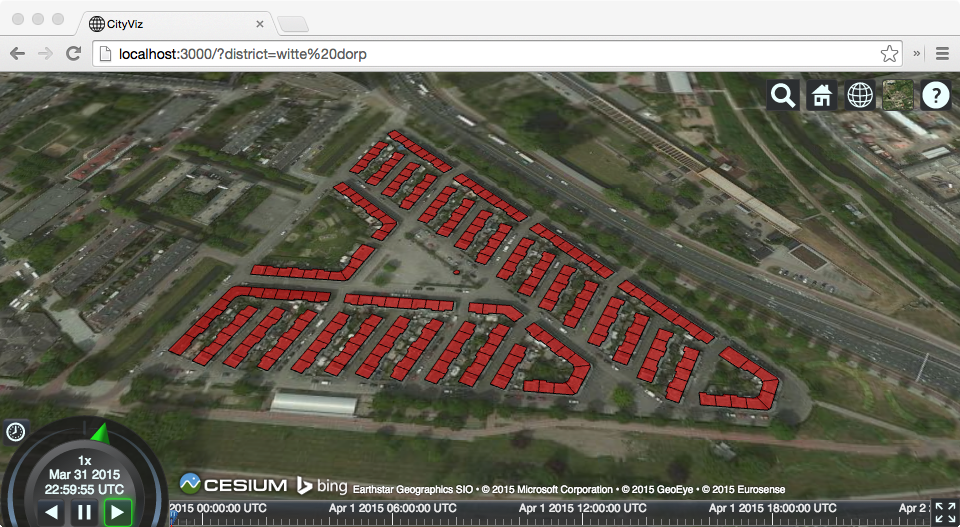
localhost:3000/cityObjects?district=witte%20dorp
Open localhost:3000 in your Browser to get a interactive webgl globe including renderings of the ground-surfaces of all buildings in your database. (Attention: This might crash when you have too many (~ >50000) cityObjects in your database)
The query parameter numberOfCityObjects can be used to limit the number of
cityObjects to be rendered:
localhost:3000?numberOfCityObjects=500
This uses the streaming version of the cityObjects endpoint in a buffered way. Clients for the streaming api and for the event-stream api which leverage streaming are work in progress in the app/js/index.js file.
The query parameter district is the same as in the backend.
localhost:3000?district=witte%20dorp
Detailed Installation
This should be used if you want to use the official GUIs and execute the 3DCityDb setup process manually instead of using the bundled version (not recommended).
On Mac:
-
Install postgresapp (Already contains PostGIS plugin which otherwise would have to be installed as well)
-
Follow the instructions on postgresapp.com/documentation to add the
psqlcommand to your command line. -
Download 3DCityDB 2.1
-
Run setup.jar to install 3DCityDB
-
- Create a new database in postgres (You can use pagadmin to inspect and interact with your database.)
- Enable the postgis extension for it by right clicking Extensions > name: postgis > OK.
-
Open
/Applications/3DCityDB-Importer-Exporter/3dcitydb/postgis/CREATE_DB.shwith a text-editor and adapt the exported variables to your settings.Then create the necessary schemas and tables by executing this shell-script. (For the Rotterdam model use SRID: 28992 and name EPSG: 28992)
-
Open the 3D City Database Importer/Exporter by executing
/Applications/3DCityDB-Importer-Exporter/3DCityDB-Importer-Exporter.shand connect to the database -
Import your files with the Importer/Exporter.
Links
- rmx/collada-converter - A library for converting COLLADA files to a format suitable for WebGL
- rmx/threejs-collada
- KhronosGroup/glTF
- f4map
- lo-th.github.io/3d.city
- https://github.com/mrdoob/three.js/issues/5708
- arcgis - Gives everyone in your organization the ability to discover, use, make and share maps.
Gltf
- mason.gmu.edu/~bcoughl2/cs752 - 3D for the Modern Web: Declarative 3D and glTF