README
glTF Optimizer
gltf-optimizer is a tool that optimizes models and textures by combining several command-line tools.
Getting Started
Install Python3
Install Node.js if you don't already have it, and then:
npm install -g imagemagick
npm install -g gltf-pipeline
npm install -g @gltf-transform/cli
Install toKTX toKTX can be built through cmake, or in the case of mac os, the toKtx Unix executable file in this path can be used by putting it in the path (/usr/local/bin) to which the environment variable is added.
Ref
- imagemagick : used for texture resize. (https://imagemagick.org/Usage/resize/)
- toktx : used to convert the format of texture to ktx2 (https://github.khronos.org/KTX-Software/ktxtools/toktx.html)
- gltf-pipeline : used for converting glTF to glb and extracting separate textures(https://github.com/CesiumGS/gltf-pipeline)
- @gltf-transform/cli : used for optimizing the mesh (https://gltf-transform.donmccurdy.com/cli)
Optimize a glTF or glb
gltf-optimizer --path <input gltf path> --output <output gltf path> --config <config json path>
gltf-optimizer --path ./source --output ./public/assets/ --config ./tools/config.json
Update Mode
gltf-optimizer --path <input gltf path> --output <output gltf path> --config <config json path> --update
If you enter --update on the command line, it determines if there is already a glb or gltf with the same name in the output path and optimizes only those files that do not exist.
{
  "scripts": {
    "build-gltf": "yarn build-gltf-all --update",
    "build-gltf-all": "python3 tools/gltf-optimizer.py --path ./source --output ./public --config tools/config.json"
  }
}
It is convenient to use it by registering it in package.json like this.
Output
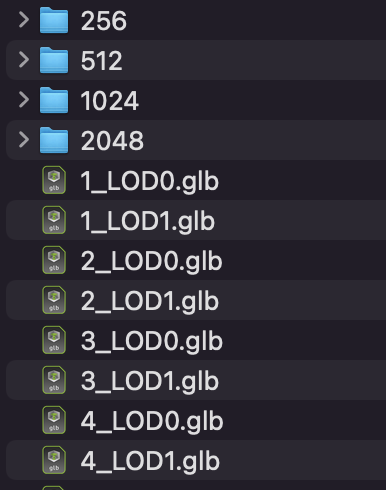
Using Babylonjs
SceneLoader.OnPluginActivatedObservable.add((loader) => {
  const gltfLoader = loader as unknown as GLTFFileLoader;
  gltfLoader.onParsed = (data) => {
    // @ts-ignore
    const images: IImage[] = data.json['images'];
    for (const image of images) {
      if (image.uri) {
        // textureMaxSize : 256, 512 ...
        image.uri = `${textureMaxSize}/${image.uri}`;
      }
    }
  };
});
In this way, when loading a gltf/glb file, you can receive data through the onParsed event and change the uri to textureMaxSize at runtime.
const src = `/assets/model${suffix}.glb`
await SceneLoader.ImportMeshAsync(
  '',
  src
);
It is useful to change the model like this and call it.
Config.json
{
  "output_ext" : [".glb", ".gltf"],
  "texture_settings" : [
    {
      "max_size" : 512,
      "scale" : 1,

      "defualt_format" : "etc1s",
      "keywords" : ["final"],
    },
    {
      "max_size" : 2048,
      "scale" : 1,

      "defualt_format" : "etc1s",
      "keywords" : ["final"],

      "astc_blk_d" : "8x8",
      "uastc_quality" : 2,
      "uastc_rdo_l": 0.5,
      "uastc_rdo_d": 8192,
      "zcmp": 22,

      "clevel": 1,
      "qlevel" : 128,

      "assign_oetf": "srgb"
    }
  ],
  "model_settings" : [
    {
      "suffix" : "_LOD0",
    },
    {
      "suffix" : "_LOD1",
      "lock_border" : false,

      "tolerance" : 0.0001,
      "ratio" : 0.5,
      "error" : 0.01,

      "decode_speed" : 7,
      "encode_speed": 7,
      "quantize_position": 11,
      "quantize_normal" : 8,
      "quantize_texcoord": 10,
      "quantize_color": 8
    }
  ]
}
"output_ext" : [".glb", ".gltf"]
- output_ext : finally, set the extension to be extracted to the output path. ".glb", ".gltf" can be set.
"texture_settings" : [
    {
      "max_size" : 512,
      "scale" : 1,

      "defualt_format" : "etc1s",
      "keywords" : ["final"],
    },
    {
      "max_size" : 2048,
      "scale" : 1,

      "defualt_format" : "etc1s",
      "keywords" : ["final"],

      "astc_blk_d" : "8x8",
      "uastc_quality" : 2,
      "uastc_rdo_l": 0.5,
      "uastc_rdo_d": 8192,
      "zcmp": 22,

      "clevel": 1,
      "qlevel" : 128,

      "assign_oetf": "srgb"
    }
  ]
These are settings related to texture optimization.
- [Required] max_size : <256|512|1024|2048|4096> sets the maximum size of the texture. Resize the size of the texture according to the ratio so that it does not exceed this value.
- [Option] scale : reduce the size of the image by this value. range is [0.01, 1.00]. default value is 1.
- [Option] defualt_format : <uastc|etc1s> sets the default format to be compressed as ktx2. default value is "etc1s".
- [Option] keywords : textures with this keyword in their name will be compressed in the opposite format to defualt_format. If defualt_format is "etc1s", textures with this keyword are compressed with uastc ktx2.
refer to (https://github.khronos.org/KTX-Software/ktxtools/toktx.html) for the values below.
-
[Option/uastc] astc_blk_d : specify which block dimension to use for compressing the textures. default value is 8x8.
-
[Option/uastc] uastc_quality : This optional parameter selects a speed vs quality tradeoff. default value is 2.
-
[Option/uastc] uastc_rdo_l : Lower values yield higher quality/larger LZ compressed files, higher values yield lower quality/smaller LZ compressed files. A good range to try is [.25,10]. For normal maps a good range is [.25,.75]. The full range is [.001,10.0]. default value is 0.5.
-
[Option/uastc] uastc_rdo_d : lower values=faster, but give less compression. default value is 8192.
-
[Option/uastc] zcmp : lower values=faster but give less compression. Values above 20 should be used with caution as they require more memory. default value is 22.
-
[Option/etc1] clevel : ETC1S / BasisLZ compression level, an encoding speed vs. quality tradeoff. Range is [0,5], Higher values are slower but give higher quality. default value is 1.
-
[Option/etc1] qlevel : ETC1S / BasisLZ quality level. Range is [1,255]. Lower gives better compression/lower quality/faster. Higher gives less compression/higher quality/slower. --qlevel automatically determines values for --max_endpoints, --max-selectors, --endpoint_rdo_threshold and --selector_rdo_threshold for the target quality level. Setting these options overrides the values determined by -qlevel which defaults to 128 if neither it nor both of --max_endpoints and --max_selectors have been set.
-
[Option/common] assign_oetf : <linear|srgb> force the created texture to have the specified transfer function. default valus is srgb.
"model_settings" : [
    {
      "suffix" : "_LOD0",
    },
    {
      "suffix" : "_LOD1",

      "tolerance" : 0.0001,
      "ratio" : 0.5,
      "error" : 0.01,
      "lock_border" : false,

      "decode_speed" : 7,
      "encode_speed": 7,
      "quantize_position": 11,
      "quantize_normal" : 8,
      "quantize_texcoord": 10,
      "quantize_color": 8
    }
  ]
These are settings related to mesh optimization.
- suffix : the suffix to append to the model to be extracted. For example, if suffix is "_LOD0" in model.glb, it is extracted as model_LOD0.glb.
refer to (https://gltf-transform.donmccurdy.com/cli) for the values below.
weld : Index Primitives and (optionally) merge similar vertices.
- [Option] tolerance : tolerance for vertex welding. default value is 0.0001. If this value is not entered, weld is omitted.
simplify
- [Option] ratio : target ratio (0–1) of vertices to keep. If this value is not provided, simplify will be skipped.
- [Option] error : limit on error, as a fraction of mesh r. default value is 0.01.
- [Option] lock_border : whether to lock topological borders of. default value is False
draco
- [Option] decode_speed : Decoding speed vs. compression level, 1–10.
- [Option] encode_speed : Encoding speed vs. compression level, 1–10.
- [Option] quantize_position : Quantization bits for POSITION, 1-16. default value is 11
- [Option] quantize_normal : Quantization bits for NORMAL, 1-16. default value is 8
- [Option] quantize_texcoord : Quantization bits for TEXCOORD_*, 1-16. default value is 10
- [Option] quantize_color : Quantization bits for COLOR_*, 1-16. default value is 8
The default value was set by referring to gltf-pipeline(https://github.com/CesiumGS/gltf-pipeline).