README
citygml2-to-citygml3
A Java tool used to transform CityGML v2.0 to CityGML v3.0 files.
This project is still in early development and subject to change. (However, it is already usable/useful and many datasets from different cities and countries could be successfully transformed.)
How to run
-
The source code can be cloned using
git clone https://github.com/tum-gis/citygml2-to-citygml3or downloading the latest release here.
-
The program can then be executed by running the
Run.batfile (in Windows) or using the following command line:java -jar citygml2-to-citygml3.jar -
The result is by default saved in folder output, such as output/FZKHaus_v3.gml (only visible after the program is complete). Simply open this folder/file to see the output.
Configurations
The program settings can be adjusted in the configuration file SETTINGS.txt. Depending on the use-case, users may change these configurations to fit their needs:
| Parameter | Description | Default |
|---|---|---|
INPUT_FILE | The location of the source CityGML v2.0 file | input/FZKHaus.gml |
XSL_FILE | The location of the XSL file used for transformation | xsl/Transform.xsl |
OUTPUT_FILE | The location of the transformed CityGML v3.0 file | output/FZKHaus_v3.gml |
LOD4_TO_LOD3 | Set to true if all found LOD 4 elements are to be replaced by the corresponding LOD 3 elements. The value false will remove all found LOD 4 elements. | true |
LOD4_GEOMETRY | Specifies how to handle found lod4Geometry objects. If the LOD4_TO_LOD3 is set to true, lod4Geometry can either be converted to lod3MultiSurface, lod3MultiCurve orlod3Solid. | lod3MultiSurface |
For reference, the file FZKHaus_v3.gml, which contains all LOD 0-4 information, can be used as an example of how the transformed file should look like.
Namespaces
To produce the best results, the input CityGML document must satisfy the following conditions:
-
It must be encoded in CityGML v2.0;
-
All namespaces and schemata must be declared in the root element (i.e.
CityModel) and nowhere else (e.g. local namespaces in elements other than the root are not recommended); -
Namespace prefixes and URIs as well as schema locations must correspond to the values allowed by the tool.
Please ensure to check the namespaces and schemata of your CityGML documents accordingly before executing the tool.
The list of allowed namespaces in CityGML v2.0 as well as in v3.0 are selected by default as follows:
| Namespace prefix | Module | Namespace URI in CityGML v2.0 | Namespace URI in CityGML v3.0 |
|---|---|---|---|
xmlns:app | Appearance | http://www.opengis.net/citygml/appearance/2.0 | http://www.opengis.net/citygml/appearance/3.0 |
xmlns:brid | Bridge | http://www.opengis.net/citygml/bridge/2.0 | http://www.opengis.net/citygml/bridge/3.0 |
xmlns:bldg | Building | http://www.opengis.net/citygml/building/2.0 | http://www.opengis.net/citygml/building/3.0 |
xmlns:frn | City Furniture | http://www.opengis.net/citygml/cityfurniture/2.0 | http://www.opengis.net/citygml/cityfurniture/3.0 |
xmlns:grp | City Object Group | http://www.opengis.net/citygml/cityobjectgroup/2.0 | http://www.opengis.net/citygml/cityobjectgroup/3.0 |
xmlns:con | Construction | http://www.opengis.net/citygml/construction/3.0 | |
xmlns:core | Core | http://www.opengis.net/citygml/2.0 | http://www.opengis.net/citygml/3.0 |
xmlns:dyn | Dynamizer | http://www.opengis.net/citygml/dynamizer/3.0 | |
xmlns:gen | Generics | http://www.opengis.net/citygml/generics/2.0 | http://www.opengis.net/citygml/generics/3.0 |
xmlns:luse | LandUse | http://www.opengis.net/citygml/landuse/2.0 | http://www.opengis.net/citygml/landuse/3.0 |
xmlns:dem | Relief | http://www.opengis.net/citygml/relief/2.0 | http://www.opengis.net/citygml/relief/3.0 |
xmlns:pcl | PointCloud | http://www.opengis.net/citygml/pointcloud/3.0 | |
xmlns:tran | Transportation | http://www.opengis.net/citygml/transportation/2.0 | http://www.opengis.net/citygml/transportation/3.0 |
xmlns:tun | Tunnel | http://www.opengis.net/citygml/tunnel/2.0 | http://www.opengis.net/citygml/tunnel/3.0 |
xmlns:veg | Vegetation | http://www.opengis.net/citygml/vegetation/2.0 | http://www.opengis.net/citygml/vegetation/3.0 |
xmlns:vers | Versioning | http://www.opengis.net/citygml/versioning/3.0 | |
xmlns:wtr | WaterBody | http://www.opengis.net/citygml/waterbody/2.0 | http://www.opengis.net/citygml/waterbody/3.0 |
xmlns:tsml | TimeseriesML | http://www.opengis.net/tsml/1.0 | |
xmlns:sos | Sensor Observation Service | http://www.opengis.net/sos/2.0 | http://www.opengis.net/sos/2.0 |
xmlns:xAL | eXtensible Address Language | urn:oasis:names:tc:ciq:xsdschema:xAL:2.0 | urn:oasis:names:tc:ciq:xsdschema:xAL:2.0 |
xmlns:xlink | XLink | http://www.w3.org/1999/xlink | http://www.w3.org/1999/xlink |
xmlns:xsi | XML Schema Instance | http://www.w3.org/2001/XMLSchema-instance | http://www.w3.org/2001/XMLSchema-instance |
xmlns:gml | Geography Markup Language | http://www.opengis.net/gml | http://www.opengis.net/gml/3.2 |
xmlns | Default namespace | http://www.opengis.net/citygml/2.0 | http://www.opengis.net/citygml/3.0 |
The bold namespaces listed in the table above are new in CityGMl v3.0 compared to v2.0.
Note that the XML schemata for CityGML 3.0 are still in active development and subject to change. For the latest XSD files, please refer to the OGC CityGML 3.0 Encodings GitHub page.
Supported CityGML feature types and elements
The list of supported CityGML v3.0 feature types and elements in the current implementation is shown as follows (note that this list may change in the future):
gml:namecreationDateand other similar date/time elementsexternalReferencecore:appearance(bothapp:ParameterizedTextureandapp:X3DMaterial)genericAttribute(gen:StringAttribute,gen:intAttribute,gen:doubleAttribute,gen:dateAttribute,gen:uriAttributeandgen:measureAttribute)bldg:functionbldg:roofTypebldg:heightAboveGroundBoundarySurfacesandBuildingPartsAbstractConstructiveElementsuch asWindowandDoor(asVoidSurface)AbstractConstructionSurfacesuch asGroundSurface,RoofSurface,CeilingSurface,OuterCeilingSurfaceBuildingFurnituresBuildingInstallations- And many more...
For the list of changes please refer to the change logs.
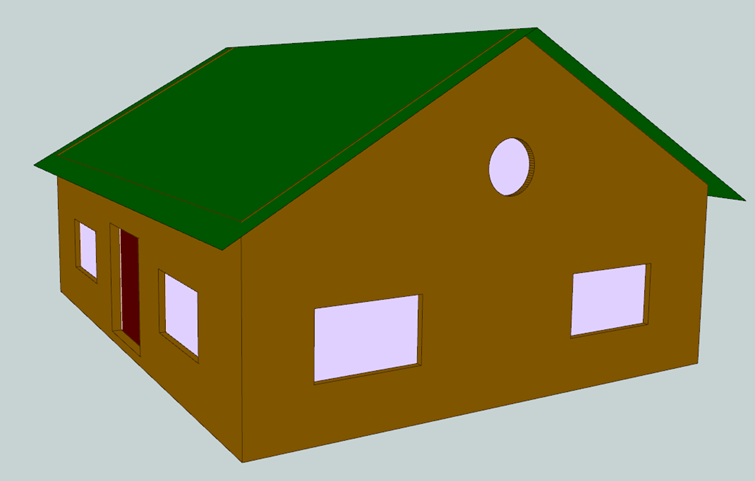
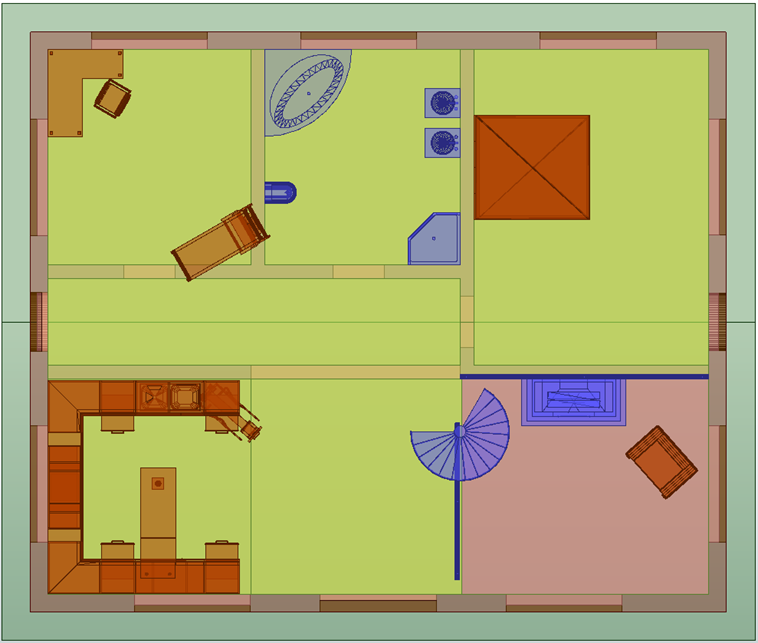
Below are the visualization screenshots taken in FME of the transformed sample dataset FZKHaus_v3.gml in 3D and 2D respectively:
Other Notes
Currently, only the Building module is supported.
The implementation was tested on a limited number of samples provide in CityGML 3.0 and thus that may not solve all use cases.