README
SecKC-MHN-Globe
Inspired by The SecKC MHN Cyber Attack Map, I wanted something similar to run in text mode. Minimum recommended terminal size is 80x24. UI elements will scale nicely to higher terminal sizes and on-the-fly window size changes are handled gracefully above the minimum recommended size.
TUI Earth Visualization with Honeypot Monitoring
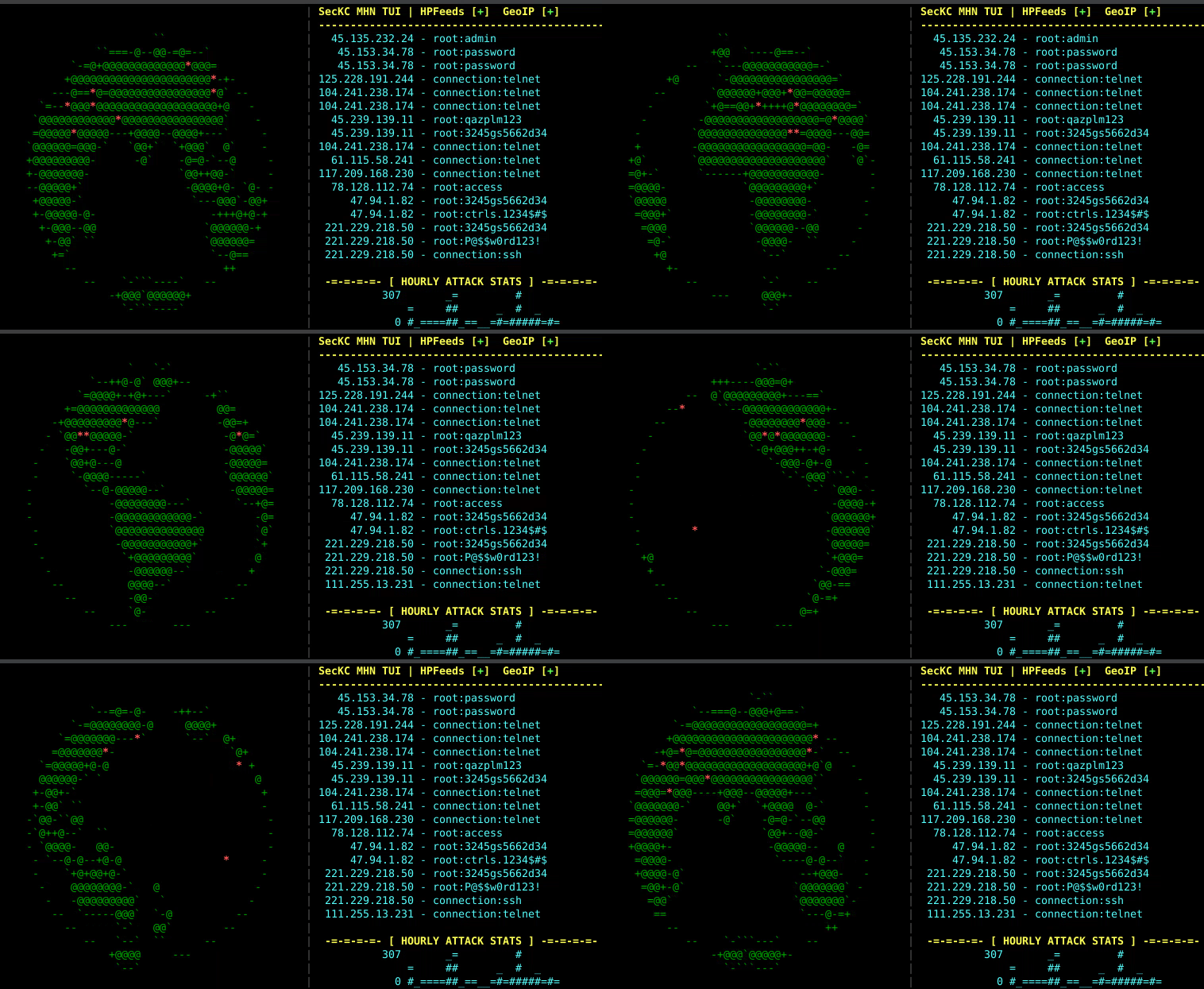
Terminal-based application displaying a rotating 3D ASCII globe with a live dashboard of incoming connection attempts. Connects to HPFeeds (honeypot data feeds) to show real-time attack data from security honeypots worldwide.



Features
- 3D ASCII Globe: Rotating Earth visualization in your terminal
- Live Attack Visualization: Red asterisks mark (approximate) attack source locations on the globe
- HPFeeds Integration: Connect to honeypot data feeds for real-time threat intelligence
- IP/Username/Password: If a login is detected from an IP, the username and password is displayed
- SSH/Telnet Probes: Connection attempts without login are displayed as connection:[ssh|telnet]
- Geographic Mapping: IP geolocation with MaxMind GeoLite2 database
- Mock Data Fallback: Generates simulated data when HPFeeds is unavailable
- Responsive Design: Adapts to terminal size with optimized layout
- Debug Logging: Comprehensive logging for troubleshooting and analysis
- Status Indicators: + or ! indicates whether HPFeeds and GeoIP are properly configured and working
- Configurable Refresh Rate: Faster refresh for smoother animation, slower for low bandwidth (serial terminals, etc)
- Monochrome Mode: For terminals that have reduced color support
- Hourly Attack Stats: An ASCII bar chart shows SecKC MHN attack volume for the past 24 hours
Build
# Clone the repository
git clone https://github.com/n0xa/SecKC-MHN-Globe.git
cd SecKC-MHN-Globe

# Build the application
go build SecKC-MHN-Globe.go

# Run with default settings (mock attack data, no attack coordinates)
./SecKC-MHN-Globe
Usage
SecKC-MHN-Globe [OPTIONS]
Command Line Options
-h Show help message
-d <filename> Enable debug logging to specified file
-s <seconds> Globe rotation period in seconds (10-300, default: 30)
-r <milliseconds> Globe refresh rate in ms (50-1000, default: 100)
-m Monochrome mode without fancy colors
-a <ratio> Character aspect ratio (height/width, 1.0-4.0, default: 2.0)
-u <url> Base URL for SecKC API (default: https://mhn.h-i-r.net/seckcapi)
-e <count> Maximum events to fetch per API call (1-500, default: 50)
-p <duration> API polling interval (1s-300s, default: 2s)
Controls
Press Q, X, Space, Esc or Ctrl+C to exit
Examples
# Default 30-second rotation
./SecKC-MHN-Globe

# Slower 60-second rotation
./SecKC-MHN-Globe -s 60

# Fast rotation with debug logging
./SecKC-MHN-Globe -s 10 -d debug.log
Configuration
Example: This program was made to interface with the Public SecKC MHN Dashboard that I maintain, which this project will try to use by default if no configuration is provided.
Dependencies
require (
    github.com/gdamore/tcell/v2 v2.8.1      // Terminal UI
)
License
This project is licensed under the BSD 2-Clause License - see the LICENSE file for details.
Troubleshooting
Common Issues
- Terminal display issues: Ensure terminal supports color and proper size
- Performance problems: Enable debug logging with
-doption - Globe landmass seems "blocky": Reduce terminal size to below 190x70
Debug Mode
Enable debug logging:
./SecKC-MHN-Globe -d debug.log
This logs:
- Screen updates and rendering
- HPFeeds message processing
- GeoIP lookup results
- Dashboard updates