README



Component Material
Material is a React utility that helps you compose and modify materials in react-three-fiber and threejs.
Examples
Quick start
yarn add component-material
import Material from 'component-material'

function CustomMaterial(props) {
  return (
    <Material
      {...props}
      // 1️⃣ declare uniforms with the correct type
      uniforms={{
        r: { value: 1, type: 'float' },
        g: { value: 0.5, type: 'float' },
        b: { value: 0, type: 'float' },
      }}>
      <Material.Frag.Body
        // 2️⃣ Access the uniforms in your shader
        children={`gl_FragColor = vec4(r, g, b, 1.0);`}
      />
    </Material>
  )
}

function Sphere() {
  return (
    <mesh>
      <sphereBufferGeometry />
      <CustomMaterial />
    </mesh>
Features
- Create custom shaders on top of existing threejs Shaders and shader-chunks
- Compose your shader code with modular injects
- Auto-completion, intellisense and typechecking
- Syntax-highlighting with either tagged glsl-literals or comment-tagged templates
- Glslify and imports via babel-plugin-glsl
<Material/>
from
By default Material extends three's MeshPhysicalMaterial. If you want to extend a different material just use the from prop passing the desired material constructor.
<Material from={THREE.MeshPhongMaterial} />
uniforms
Uniforms used inside shaders can be defined via the uniforms prop as follows
<Material
  uniforms={{
    myUniform1: { value: 0, type: 'float' },
    myUniform2: { value: [0, 1], type: 'vec2' },
  }}
/>
This will also create setters and getters for the uniforms automatically, allowing you to mutate them using props and effectively making the material reactive:
function CustomMaterial({ color }) {
  return (
    <Material
      uniforms={{ color: { value: color, type: 'vec3' } }}
      color={color} // color uniform will have the value of the color prop
    />
- The correspondences between glsl and javascript types can be seen here
- Uniforms cannot be defined twice in the same shader. So be careful not to define the same uniforms inside the
headtag.
varyings
Varying variables can be defined directly inside the shader head tag or they can be declared as prop:
<Material
  varyings={{
    myVarying1: { type: 'float' },
    myVarying2: { type: 'vec2' },
  }}
/>
This is equivalent to adding this code to both your vertex and fragment shaders heads:
float myVarying1;
vec2 myVarying2;
- Varyings don't have an initial value, only a type definition
- As uniforms, varyings cannot be defined twice in the same shader, this will give a glsl error. So be careful not to define the same varyings inside the
headtag.
Fragment- and vertex-shader composition
The Frag and Vert tags have the function of injecting the shader text, passed as children, into the preconfigured shader of the threejs material. Let's see what it means with an example:
<Material uniforms={{ time: { value: 0, type: 'float' } }}>
  <Material.Frag.Head
    children={`
    float quadraticInOut(float t) {
      float p = 2.0 * t * t;
      return t < 0.5 ? p : -p + (4.0 * t) - 1.0;
    }`}
  />
  <Material.Frag.Body
    children={`
    gl_FragColor.a = gl_FragColor.a * quadraticInOut((sin(time) + 1.0) / 2.0);`}
  />
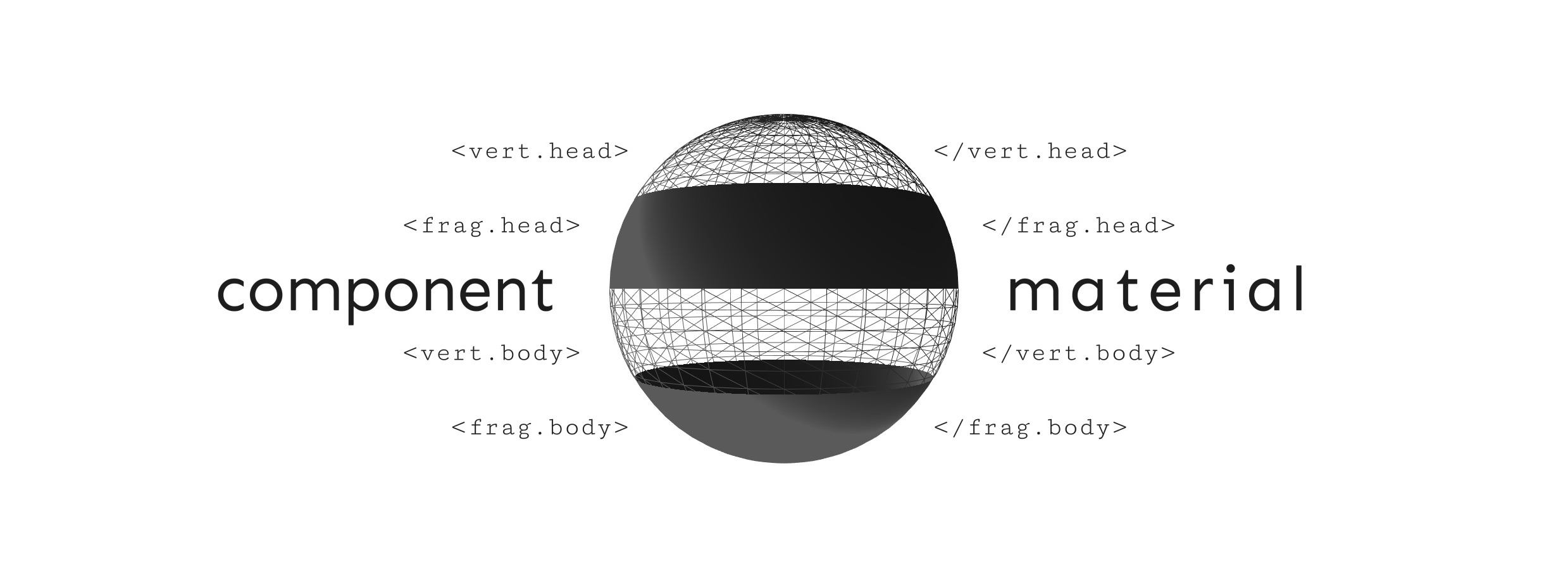
In the code above the Frag.Head component adds an easing function quadraticInOut to the fragment shader of the material, prepending it before the main function of the shader.
The Frag.Body component instead adds a line of code that modify the gl_FragColor alpha value, appending it after the last operation of the main function.
In particular, if we take as an example the fragment shader of the MeshPhysicalMaterial, Frag.Head prepends the code before this shader line, Frag.Body instead posts the code after this shader line (the dithering_fragment chunk).
The same goes for the Vert component, which however acts on the vertex shader. In particular, Vert.Head prepends the code to this shader line, while Vert.Body appends the code to this shader line (the project_vertex chunk).
It is possible to inject the code after a particular chunk just by doing
<Material.Frag.my_chunk children={`// my custom shader`} />
where my_chunk must be replaced with the name of the chunk concerned.
If we wanted to insert some code just after the emissivemap_fragment chunk (here the reference for the MeshPhysicalMaterial) then just use the following code
<Material.Frag.emissivemap_fragment children={`// my custom shader`} />
replaceChunk
The replaceChunk prop is a boolean that allows you to completely replace the chosen chunk, so instead of append the custom shader code after the chunk it will be replaced directly.
<Material.Frag.emissivemap_fragment replaceChunk children={`// my custom shader`} />
Common chunks
The Common tag is useful in case vertex shader and fragment shader share some functions.
❌ If both the fragment shader and the vertex shader share the easing function quadraticInOut, instead of writing
<Material.Vert.Head
  children={`
  float quadraticInOut(float t) {
    float p = 2.0 * t * t;
    return t < 0.5 ? p : -p + (4.0 * t) - 1.0;
  }`}
/>
<Material.Frag.Head
  children={`
  float quadraticInOut(float t) {
    float p = 2.0 * t * t;
    return t < 0.5 ? p : -p + (4.0 * t) - 1.0;
  }`}
/>
✅ we will write
<Material.Common
  children={`
  float quadraticInOut(float t) {
    float p = 2.0 * t * t;
    return t < 0.5 ? p : -p + (4.0 * t) - 1.0;
  }`}
/>