README
Vulkan glTF Viewer

Blazingly fast1 Vulkan glTF viewer.
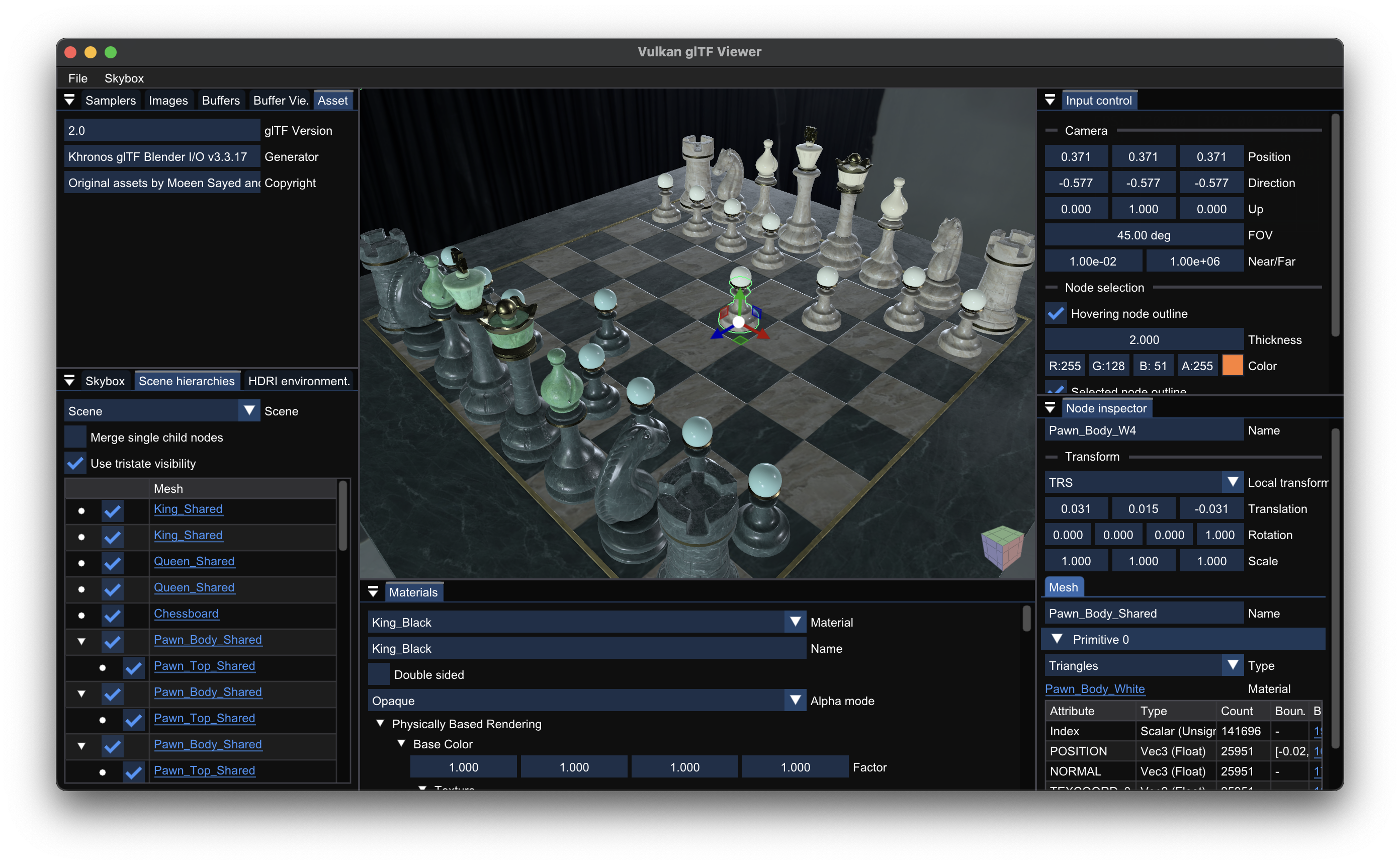
Features
- glTF 2.0 conformant, especially:
- PBR material rendering with runtime IBL resources (spherical harmonics + pre-filtered environment map) generation from input equirectangular map.
- Runtime missing tangent attribute generation using MikkTSpace algorithm for indexed geometry.
- Runtime missing per-face normal and tangent attribute generation for non-indexed geometry.
OPAQUE,MASK(using alpha testing and Alpha To Coverage) andBLEND(using Weighted Blended OIT) materials.- All primitive modes, including emulated
LINE_LOOPsupport as Vulkan does not support it natively. - Normalized and sparse accessors.
- Infinite morph targets and skinning attributes.
- Multiple scenes.
- Binary format (
.glb).
- Support glTF 2.0 extensions:
KHR_materials_emissive_strengthKHR_materials_iorKHR_materials_unlitfor lighting independent material shadingKHR_materials_variantsKHR_mesh_quantizationKHR_texture_basisufor BC7 GPU compression texture decodingKHR_texture_transformEXT_mesh_gpu_instancingfor instancing multiple meshes with the same geometryEXT_meshopt_compression
- Configurable MSAA sample count.
- Support HDR and EXR skybox.
- File loading using platform-native file dialog.
- Pixel perfect node selection and transformation using ImGuizmo.
- Arbitrary sized outline rendering using Jump Flooding Algorithm.
- Adjust node visibility in scene hierarchy tree.
- GUI for used asset resources (buffers, images, samplers, etc.) list with docking support.
- Grid rendering with dynamic scale adjustment.
Performance
Click the below image will redirect the page to the YouTube video (due to the GitHub's policy, I cannot directly embed the video into markdown).
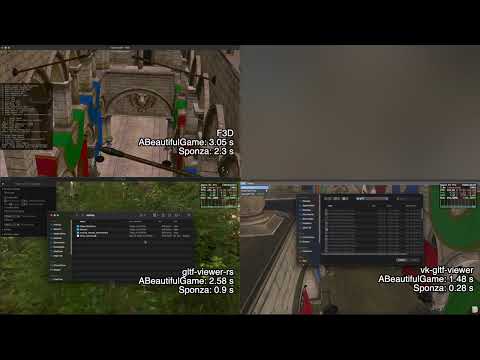
See Performance Comparison page for the performance comparison with other desktop glTF viewers.
I initially developed this application for leveraging Vulkan's performance and using some modern GPU features, like bindless/GPU driven rendering/etc. There are two main goals for this application: speed and memory consumption. Here are some key points:
Speed
- Fully bindless: no descriptor set update/vertex buffer binding during rendering.
- Descriptor sets are only updated at the model loading time.
- Textures are accessed with runtime-descriptor indexing using
VK_EXT_descriptor_indexingextension. - Use Vertex Pulling with
VK_KHR_buffer_device_address. Only index buffers are bound to the command buffer.
- Fully GPU driven rendering: uses both instancing and multi draw indirect with optimally sorted rendering order. Regardless of the material count and scene's complexity, all scene nodes can be rendered with fixed amount of draw calls.
- Significant less asset loading time: glTF buffer memories are directly
memcpyed into the GPU memory with dedicated transfer queue. No pre-processing is required!- Thanks to the vertex pulling, pipeline is vertex input state agnostic, therefore no pre-processing is required.
- Also, it considers whether the GPU is UMA (unified memory architecture) or not, and use the optimal way to transfer the buffer data.
- Asynchronous IBL resources generation using only compute shader: cubemap generation (including mipmapping), spherical harmonics calculation and prefiltered map generation are done in compute shader, which can be done with the graphics operation in parallel.
- Use subgroup operation to directly generate 5 mipmaps in a single dispatch with L2 cache friendly way (if you're wondering about this, here's my repository which explains the method in detail).
- Use subgroup operation to reduce the spherical harmonics.
- Multithreaded image decoding and MikkTSpace tangent attribute generation.
- Used frames in flight to stabilize the FPS.
Memory Consumption
- Primary rendering pass is done with multiple subpasses, which makes most of the used attachment images memoryless. If your GPU is tile based, only jump flood images and swapchain images would be existed in the physical memory.
- Use explicit queue family ownership transfer and avoid
VK_IMAGE_USAGE_STORAGE_BITflags for the images, which can enable the Delta Color Compression (DCC) in the AMD GPUs (I've not tested this in an AMD GPUs). - As mentioned in above, direct copying the buffer data can reduce the memory footprint during the loading time.
- After IBL resource generation, equirectangular map and cubemap image sizes are reduced with pre-color correction. This leads up to ~4x smaller GPU memory usage if you're using higher resolution cubemap.
Usage
Vulkan Requirements
[!WARNING] Currently the latest Vulkan SDK (1.4.335) is broken when using Vulkan-Hpp named module. Please use Vulkan SDK 1.4.328 until the issue is solved.
The extensions and feature used in this application are quite common in the modern desktop GPU drivers, so I hope you don't have any problem with this.
[!TIP] My primary development environment is Apple M1 Pro, so if you're MoltenVK user, you'll be able to run this application.
Show requirements list
- Vulkan 1.2 or later
- Device Extensions
VK_KHR_dynamic_renderingVK_KHR_synchronization2VK_EXT_extended_dynamic_state(dynamic state cull mode)VK_KHR_push_descriptorVK_KHR_swapchain- (optional)
VK_KHR_swapchain_mutable_format(proper ImGui gamma correction, UI color will lose the color if the extension not presented) - (optional)
VK_EXT_attachment_feedback_loop_layout(optimized bloom composition) - (optional)
VK_EXT_index_type_uint8(if not presented, unsigned byte primitive indices will re-generated withuint16_ts) - (optional)
VK_EXT_shader_stencil_export(more plausible bloom effect) - (optional)
VK_AMD_shader_image_load_store_lod(can replace the descriptor indexing based cubemap mipmapping and prefilteredmap generation2) - (optional)
VK_EXT_extended_dynamic_state3(if supported andVkPhysicalDeviceExtendedDynamicState3PropertiesEXT::dynamicPrimitiveTopologyUnrestrictedistrue, can reduce the pipeline switch for different primitive topologies)
- Device Features
VkPhysicalDeviceFeaturesdepthClampdrawIndirectFirstInstancemultiViewportsamplerAnistropyshaderInt16multiDrawIndirectshaderStorageImageWriteWithoutFormatindependentBlend(Weighted Blended OIT)fragmentStoresAndAtomics
VkPhysicalDeviceVulkan11FeaturesshaderDrawParameters(usegl_BaseInstancefor primitive index)storageBuffer16BitAccessuniformAndStorageBuffer16BitAccessmultiview(reducing cubemap image precision with color correction)
VkPhysicalDeviceVulkan12FeaturesbufferDeviceAddressdescriptorIndexingdescriptorBindingPartiallyBounddescriptorBindingSampledImageUpdateAfterBinddescriptorBindingVariableDescriptorCountruntimeDescriptorArrayshaderOutputViewportIndexseparateDepthStencilLayoutsstorageBuffer8BitAccessscalarBlockLayouttimelineSemaphoreshaderInt8- (optional)
drawIndirectCount(If not presented, GPU frustum culling will be unavailable and fallback to the CPU frustum culling.) - (optional)
shaderBufferInt64Atomics(better mouse picking precision)
VkPhysicalDeviceDynamicRenderingFeaturesVkPhysicalDeviceSynchronization2FeaturesVkPhysicalDeviceExtendedDynamicStateFeaturesEXT- (optional)
VkPhysicalDeviceIndexTypeUint8FeaturesEXT(if not presented, unsigned byte primitive indices will re-generated withuint16_ts) - (optional)
VkPhysicalDeviceAttachmentFeedbackLoopLayoutFeaturesEXT
- Device Limits
- Subgroup size must be at least 16.
- Sampler anisotropy must support 16x.
- Available asset texture count is restricted by:
- For Apple system, sampler and image count must be less than
maxDescriptorSetUpdateAfterBindSamplersandmaxDescriptorSetUpdateAfterBindSampledImages, respectively. - Otherwise, texture count must be less than
maxDescriptorSetUpdateAfterBindSamplers.
- For Apple system, sampler and image count must be less than
Build
This project requires support for C++20 modules and the C++23 standard library. The supported compilers are:
- Clang 19.1.1
- MSVC 19.42
The following build tools are required:
- CMake 3.30
- Ninja 1.11
Additionally, you need vcpkg for dependency management. Make sure VCPKG_ROOT environment variable is defined as your vcpkg source directory path!
Dependencies
This project depends on:
- boost-container
- boost-container-hash
- cstring_view
- fastgltf
- GLFW
- glm
- ImGui
- ImGuizmo
- MikkTSpace
- Native File Dialog Extended
- stb_image
- thread-pool
- My own Vulkan-Hpp helper library, vku (branch
module), which has the following dependencies:
Dependencies will be automatically fetched via vcpkg.
Also, there are some optional dependencies that are enabling the features. These are not included in vcpkg.json by default.
- CGAL for exact bounding volume calculation (due to its usage, this project is licensed under GPL.)
- KTX-Software for support
KHR_texture_basisuextension. - OpenEXR if you want to use
.exrskybox.
You can provide the dependencies at the CMake configuration time to enable the corresponding features. Followings are some ways to provide.
# Provide all optional dependencies, with platform agnostic way (most recommended).
# Be aware that fetching cgal will be extremely slow since it fetches all of the boost dependencies and build gmp and mpfr.
vcpkg add port cgal ktx openexr

# Provide CGAL, if you're using Ubuntu and apt system package manager.
sudo apt install libcgal-dev

# Provide OpenEXR, if you're using macOS and Homebrew system package manager.
brew install openexr
Build Steps
[!TIP] This project uses GitHub Runner to ensure build compatibility on Windows (with MSVC and MinGW Clang), macOS and Linux (with Clang), with dependency management handled by vcpkg. You can check the workflow files in the .github/workflows folder.
First, you have to clone the repository.
git clone https://github.com/stripe2933/vk-gltf-viewer
cd vk-gltf-viewer
1. MSVC + Windows
The CMake preset is given by default.
cmake --preset=default
cmake --build build -t vk-gltf-viewer
The executable will be located in build folder.
2. MinGW Clang + Windows
Install Clang, libc++ and extra build dependencies from MSYS2 pacman.
pacman -S mingw-w64-clang-x86_64-clang mingw-w64-clang-x86_64-libc++ mingw-w64-clang-x86_64-libwinpthread-git
Add the following CMake user preset file in your project directory. I'll assume your Clang compiler executable is at C:/tools/msys64/clang64/bin/clang++.exe.
CMakeUserPresets.json
{
  "version": 6,
  "configurePresets": [
    {
      "name": "windows-mingw-clang",
      "inherits": "default",
      "cacheVariables": {
        "CMAKE_C_COMPILER": "C:/tools/msys64/clang64/bin/clang.exe",
        "CMAKE_CXX_COMPILER": "C:/tools/msys64/clang64/bin/clang++.exe",
        "CMAKE_CXX_FLAGS": "-stdlib=libc++",
        "VCPKG_TARGET_TRIPLET": "x64-windows-mingw-clang"
      }
    }
  ]
}
VCPKG_TARGET_TRIPLET configuration parameter is mandatory for make vcpkg uses Clang compiler instead of the system default compiler. Add following vcpkg toolchain and triplet files.
mingw-clang-toolchain.cmake
include($ENV{VCPKG_ROOT}/scripts/toolchains/mingw.cmake)

set(CMAKE_C_COMPILER C:/tools/msys64/clang64/bin/clang.exe)
set(CMAKE_CXX_COMPILER C:/tools/msys64/clang64/bin/clang++.exe)
triplets/x64-windows-mingw-clang.cmake
set(VCPKG_TARGET_ARCHITECTURE x64)
set(VCPKG_CRT_LINKAGE dynamic)
set(VCPKG_LIBRARY_LINKAGE static)
set(VCPKG_ENV_PASSTHROUGH "PATH;VCPKG_ROOT")

set(VCPKG_CMAKE_SYSTEM_NAME MinGW)
set(VCPKG_CHAINLOAD_TOOLCHAIN_FILE ${CMAKE_CURRENT_LIST_DIR}/../mingw-clang-toolchain.cmake)

set(VCPKG_C_FLAGS "")
set(VCPKG_CXX_FLAGS "-stdlib=libc++")
Configure and build the project with windows-mingw-clang configuration preset.
cmake --preset=windows-mingw-clang
cmake --build build -t vk-gltf-viewer
The executable will be located in build folder.
3. Clang + Linux
Install libc++ and extra build dependencies from apt.
sudo apt install clang-19 clang-tools-19 libc++-19-dev libc++abi-19-dev xorg-dev libtool libltdl-dev
Add the following CMake user preset file in your project directory. I'll assume your Clang compiler executable is at /usr/bin/.
CMakeUserPresets.json
{
  "version": 6,
  "configurePresets": [
    {
      "name": "linux-clang",
      "inherits": "default",
      "cacheVariables": {
        "CMAKE_C_COMPILER": "/usr/bin/clang-19",
        "CMAKE_CXX_COMPILER": "/usr/bin/clang++-19",
        "CMAKE_CXX_FLAGS": "-stdlib=libc++",
        "CMAKE_EXE_LINKER_FLAGS": "-stdlib=libc++ -lc++abi",
        "VCPKG_TARGET_TRIPLET": "x64-linux-clang"
      }
    }
  ]
}
VCPKG_TARGET_TRIPLET configuration parameter is mandatory for make vcpkg uses Clang compiler instead of the system default compiler. Add following vcpkg toolchain and triplet files.
clang-toolchain.cmake
include($ENV{VCPKG_ROOT}/scripts/toolchains/linux.cmake)

set(CMAKE_C_COMPILER /usr/bin/clang-19)
set(CMAKE_CXX_COMPILER /usr/bin/clang++-19)
triplets/x64-linux-clang.cmake
set(VCPKG_TARGET_ARCHITECTURE x64)
set(VCPKG_CRT_LINKAGE dynamic)
set(VCPKG_LIBRARY_LINKAGE static)
set(VCPKG_CMAKE_SYSTEM_NAME Linux)
set(VCPKG_CHAINLOAD_TOOLCHAIN_FILE ${CMAKE_CURRENT_LIST_DIR}/../clang-toolchain.cmake)

set(VCPKG_C_FLAGS "")
set(VCPKG_CXX_FLAGS "-stdlib=libc++")
set(VCPKG_LINKER_FLAGS "-stdlib=libc++ -lc++abi")
Configure and build the project with linux-clang configuration preset.
cmake --preset=linux-clang
cmake --build build -t vk-gltf-viewer
The executable will be located in build folder.
4. Clang + macOS
Install extra build dependencies from homebrew.
brew install autoconf automake libtool nasm
Add the following CMake user preset file in your project directory. I'll assume your Clang compiler executable is at /opt/homebrew/opt/llvm/bin/.
CMakeUserPresets.json
{
  "version": 6,
  "configurePresets": [
    {
      "name": "macos-clang",
      "inherits": "default",
      "cacheVariables": {
        "CMAKE_C_COMPILER": "/opt/homebrew/opt/llvm/bin/clang",
        "CMAKE_CXX_COMPILER": "/opt/homebrew/opt/llvm/bin/clang++",
        "VCPKG_TARGET_TRIPLET": "arm64-macos-clang"
      }
    }
  ]
}
VCPKG_TARGET_TRIPLET configuration parameter is mandatory for make vcpkg uses Clang compiler instead of the system default compiler. Add following vcpkg toolchain and triplet files.
homebrew-clang-toolchain.cmake
include($ENV{VCPKG_ROOT}/scripts/toolchains/osx.cmake)

set(CMAKE_C_COMPILER /opt/homebrew/opt/llvm/bin/clang)
set(CMAKE_CXX_COMPILER /opt/homebrew/opt/llvm/bin/clang++)
triplets/arm64-macos-clang.cmake
set(VCPKG_TARGET_ARCHITECTURE arm64)
set(VCPKG_CRT_LINKAGE dynamic)
set(VCPKG_LIBRARY_LINKAGE static)
set(VCPKG_CMAKE_SYSTEM_NAME Darwin)
set(VCPKG_CHAINLOAD_TOOLCHAIN_FILE ${CMAKE_CURRENT_LIST_DIR}/../homebrew-clang-toolchain.cmake)
Configure and build the project with macos-clang configuration preset.
cmake --preset=macos-clang
cmake --build build -t vk-gltf-viewer
The executable will be located in build folder.
Shader compilation
All shaders are located in the shaders folder and will be automatically compiled to SPIR-V format during the CMake configuration time. The result SPIR-V binary files are located in the build/shader folder.
Milestones
- Basis Universal texture support (
KHR_texture_basisu). - Automatic camera position adjustment based on the bounding sphere calculation.
- Animations.
- Skinning
- Frustum culling
- CPU frustum culling
- GPU frustum culling
- Occlusion culling
- Reduce skybox memory usage with BC6H compressed cubemap.
License
This project is licensed under the GPL-v3 License. See the LICENSE file for details.
Footnotes
-
I like this term because it's hilarious for several reasons, but it's no joke! It has the significantly faster glTF model loading speed than the other the viewers I've tested. See Performance Comparison page for details. ↩
-
On Apple GPU platform prior to the MoltenVK 1.2.11 (which enables the Metal Argument Buffer by default),
maxPerStageDescriptorUpdateAfterBindStorageImagesis 8. It limited the cubemap resoluton and prefilteredmap roughnesslevels. Instead, it can useVK_AMD_shader_image_load_store_lodextension to replace the descriptor indexing based cubemap mipmapping and prefilteredmap generation. ↩