README
WebAR.rocks.train
Object detection, tracking, and 6DoF pose estimation in web browser
Better than a long explanation, a short video:
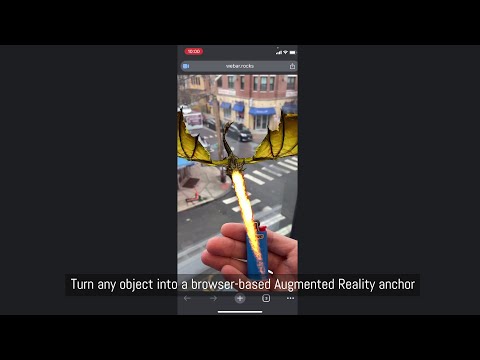
Do you have a lighter? Let the dragon light it on our live demo.
Introduction
This repository hosts a full Integrated Training Environment. You can train your own neural network models directly in the web browser and interactively monitor the training process.
The main use case is object detection and tracking and pose estimation: you can train a neural network model to detect and track a real-world object (for example, a lighter) with 6 Degrees of Freedom.. Once trained, this model can be used with WebAR.rocks.object to create a web-based augmented reality application. For instance, you could have a genie pop out of the lighter in augmented reality, as if it were a magic lamp.
This software is fully standalone. It does not require any third party machine learning framework (Google TensorFlow, Torch, Keras, etc.).
Table of Contents
Features
- Neural network training for:
- Object detection, tracking, and 6DoF pose estimation (models can be used in WebAR.rocks.object)
- Image classification (for debugging and testing purposes)
- Live monitoring of the training process through a web interface
- Export trained neural networks as JSON files
- Web Augmented reality object detection and tracking features:
- 6 DoF pose estimation,
- multiple objects can be detected simultaneously (but as soon as one object is detected then it switches to the tracking mode and only the detected object is tracked),
- possibility of using the device IMU to improve the precision of the rotation.
Architecture
/css/: Styles for the integrated training environment/images/: Images used in the integrated training environment/libs/: Third-party libraries/src/: Source code/glsl/: Shader code/js/: JavaScript code/preprocessing/: Image preprocessing modules/problemProviders/: Problem providers (e.g., object detection or image classification)/share/: Contains the GL debugger/trainer/: Main directory for the integrated training environment/core/: Core object model (trainer, neural network, and subcomponents)/imageProcessing/: Image transformations for pre- and post-problem provider execution/UI/: User interface components/webgl/: Wrappers for WebGL objects
/trainingData/: Data used for neural network training/images/: Image-based datasets/models3D/: 3D object datasets
/trainingScripts/: Scripts used to train neural networks within the integrated environment/tutorials/: Tutorials to help you get started/players/: Web application demos using trained neural networks/webar-rocks-object-boilerplate/: React + Vite web application boilerplate with a lighter/webar-rocks-object-lighter-dragon/: React + Vite web application displaying a dragon lighting a lighter
/trainer.html: The integrated training environment
Philosophy
In the Web Browser
Training neural networks on GPUs in the browser may seem unconventional, but it has several advantages:
- No installation required (no CUDA or similar dependencies). Maintenance is minimal, and cross-platform compatibility is guaranteed.
- The training runs on the GPU, so performance is not hindered by JavaScript’s overhead.
- It uses WebGL, which is well-optimized for gaming GPUs.
- A built-in interface helps you monitor and visualize the training process, including textures (all data is stored in textures).
Using Synthetic Data
Object detection and tracking are performed using synthetic data generated in real time with THREE.js from 3D models. This approach offers significant benefits:
- Acquiring a 3D model is typically faster and cheaper than collecting thousands of annotated images.
- It reduces the risk of overfitting on real-world images.
- Lower memory requirements make it feasible to train on mid-range gaming GPUs.
- It eliminates manual annotation errors.
- Changes to training conditions (e.g., lighting) require only script modifications rather than collecting a new dataset.
Only on the GPU
What happens on the GPU stays on the GPU.
WebGL provides direct access to powerful GPU capabilities in the browser, while JavaScript itself can be relatively slow. Data transfers between the GPU and CPU are also slow, so it is crucial to keep as much work as possible on the GPU.
A single training iteration for object detection and tracking includes:
- Generating a sample image from the 3D model using THREE.js
- Performing a forward pass (feedforward) through the neural network
- Performing a backward pass (backpropagation) to compute gradients
- Updating network parameters (weights, biases)
All these steps run entirely on the GPU. This requires:
- A shared WebGL context between THREE.js and the training engine (requiring some modifications to THREE.js).
- In most training iterations, no results are read by the CPU. A sequence of such iterations is called a
minibatch.
With a medium range gaming GPU, we can run about 500 training cycles per second. The GPU usage should be close to 100%.
Workflow
- Open the integrated training environment web application.
- Open and edit the training script. This script will:
- Instantiate a neural network with a specific architecture.
- Instantiate a problem using a problem provider (e.g., object detection or image classification) and load relevant data.
- Instantiate a trainer to train the neural network to solve the problem.
- Start the training.
- Run the training script. The trainer will load the data and train the neural network, with progress displayed in real time.
- Once the training is done (the learning curve flattens), you save the neural network as a JSON file.
- You use the neural network with WebAR.rocks.object or with a boilerplate provided in the /players directory.
WebAR.rocks Services
Contact us at contact__at__webar.rocks if you need:
- Support
- Neural network training
- Optimization or consulting for your projects
- Integration support or development services for applications using trained models
- Neural network quantization (reducing model size by a factor of ~10)
- Consultation on your workflow
- Deployment of this software to AWS EC2 or building an optimized training setup
We have already trained networks to detect and track:
- A coin
- Cans (Sprite, Coke, Red Bull)
- Food items (Ferrero Rocher, Cheerios box)
- Stone sculptures (a bird bath)
- Miscellaneous objects (keyboard, cup)
Documentation
We strongly recommend following this tutorial before going further: WebAR Application Tutorial: A Dragon Lights a Lighter.
Quick Start
-
Clone this GitHub repository.
-
Start a static web server (assuming
pythonis installed):python -m SimpleHTTPServer -
Open the following URL in your web browser: http://localhost:8000/trainer.html?code=ImageMNIST_0.js.
You should see the integrated training interface with the script located at /trainingScripts/ImageMNIST_0.js. Click RUN in the CONTROLS section to start the training. This script trains a model to classify the MNIST dataset (handwritten digits). The model learns to distinguish digits 0 through 9.
Switch to the LIVE GRAPH VIEW tab (under MONITORING) to watch the training progress in real time. The expected output digit is shown in red, and the bars on the chart represent the network’s current predictions.
Compatibility
WebAR.rocks.train uses WebGL1 and requires the following widely supported extensions:
OES_texture_float, texture_float_linear, WEBGL_color_buffer_float.
You can check your available WebGL extensions at webglreport.com.
The interface is designed for desktop use. We strongly recommend using a dedicated desktop computer with an NVIDIA GeForce GPU. Laptops or mobile devices are generally not suited for continuous, intensive GPU usage.
The players and other WebAR.rocks libraries using trained neural network models for real-time inference only don't have this strong compatibility constraints. They implement alternative execution paths (using WebGL2 or handling floating point linear texture filtering with specific shaders) to work on any devices including low-end mobile devices.
The Training Script
A full documentation of the training script API is forthcoming. For now, feel free to adapt one of the provided scripts in /trainingScripts/ to suit your needs.
Object tracking limitations
Object shape
The target object must have an aspect ratio between 1/2.5 and 2.5. An object with an aspect ratio of 1 fits into a square (equal width and height). For example, the standard Red Bull can has an aspect ratio of 2.5 (height/diameter).
Elongated objects, such as a fork, a pen, or a knife, do not meet this requirement. In such cases, it may be easier to target only a specific part of the object (e.g., the end of the fork). We only detect objects that fully fit within the camera's field of view (i.e., objects that are not partially visible).
Object materials
Highly reflective objects, such as shiny metallic items, are harder to detect. Similarly, refractive materials are more challenging due to their high variability.
Object 3D Model
The 3D model should be in one of the following file formats: .OBJ, .GLTF, or .GLB. The textures should have power-of-two dimensions, and their highest dimension (width or height) must be 2048 pixels or less.
If necessary, the 3D model should embed the PBR textures (typically the metallic-roughness texture).
We provide 3D modelling support.
Multiple objects
We can train a neural network to detect multiple objects simultaneously. The first detected object is then tracked (we currently do not support simultaneous multi-object tracking).
We have not yet tested the system's limitations. The more objects you need to detect and track, the less accurate the neural network becomes, and this also depends on the similarity between the objects. It works reliably with three objects; for more than three, you will need to conduct additional tests.
Generatization vs specification
The more generic the object, the more challenging the task becomes. For instance, detecting a generic lighter is more difficult than detecting a specific lighter model. If you require a neural network that generalizes extensively, you must use multiple 3D models for the same target and apply material tweakers to randomly alter certain materials.
Tutorials
A tutorial is included in this repository to help you get started:
More to come! Stay tuned by following us on Linkedin or X.
About the Code
This software may be used for long-term (multi-month) training on high-end GPUs, so stability is critical. Hence:
- No JavaScript bundlers are used.
- Few third-party libraries are included.
- The UI may look somewhat old-fashioned, prioritizing stability over aesthetics.
For reference, WebAR.rocks.train is part of a larger project that includes other problem providers for:
- Face detection and tracking: WebAR.rocks.face, Jeeliz VTO, Jeeliz FaceFilter
- Face 3D reconstruction: WebAR.rocks.faceDepth
- Hand and feet detection and tracking: WebAR.rocks.hand
- Visual Positioning System: WebAR.rocks.world
- Image detection and tracking: WebAR.rocks.image
References
- WebAR.rocks Website
- WebAR.rocks GitHub Repositories
- WebGL Academy (Tutorials on WebGL and THREE.js)
- WebAR.rocks on LinkedIn
- WebAR.rocks on X
Bibliography
Deep learning - general
- LeCun, Y., Bottou, L., Orr, G. B., & Müller, K. R. (2002). Efficient backprop. In Neural networks: Tricks of the trade (pp. 9-50). Berlin, Heidelberg: Springer Berlin Heidelberg.
- Michael A. Nielsen, "Neural Networks and Deep Learning"
- Karpathy, A. (2014). Convnetjs: Deep learning in your browser (2014). URL http://cs.stanford.edu/people/karpathy/convnetjs
- Klambauer, G., Unterthiner, T., Mayr, A., & Hochreiter, S. (2017). Self-normalizing neural networks. Advances in neural information processing systems, 30.
- Xavier Bourry, Kai Sasaki, Christoph Körner, Reiichiro Nakano (2018), "Deep Learning in the Browser"
- Lecun, Y. (2016). L’apprentissage profond, Cours au Collège de France.
Deep learning - activation functions
- Nguyen, A., Pham, K., Ngo, D., Ngo, T., & Pham, L. (2021, August). An analysis of state-of-the-art activation functions for supervised deep neural network. In 2021 International conference on system science and engineering (ICSSE) (pp. 215-220). IEEE.
- Hendrycks, D., & Gimpel, K. (2016). Gaussian error linear units (gelus). arXiv preprint arXiv:1606.08415.
- Heusel, M., Clevert, D. A., Klambauer, G., Mayr, A., Schwarzbauer, K., Unterthiner, T., & Hochreiter, S. (2015). ELU-networks: Fast and accurate CNN learning on imagenet. NiN, 8, 35-68.
- Xu, B. (2015). Empirical evaluation of rectified activations in convolutional network. arXiv preprint arXiv:1505.00853.
- Clevert, D. A. (2015). Fast and accurate deep network learning by exponential linear units (elus). arXiv preprint arXiv:1511.07289.
WebGL and GPU Rendering
- Akenine-Mo, T., Haines, E., & Hoffman, N. (2018). Real-time rendering.
- Cozzi, P. (Ed.). (2015). WebGL insights. CRC Press.
- Cabello, R. (2010). Three.js. URL: https://github.com/mrdoob/three.js
- Williams, L. (1983, July). Pyramidal parametrics. In Proceedings of the 10th annual conference on Computer graphics and interactive techniques (pp. 1-11).
- Scheidegger, C. Lux: the DSEL for WebGL graphics. URL: http://cscheid.github.io/lux.
- Park, S. J., Yoo, H. J., & Park, K. H. (2005). U.S. Patent No. 6,891,546. Washington, DC: U.S. Patent and Trademark Office.
- Wakayama, Y. (1996). U.S. Patent No. 5,566,284. Washington, DC: U.S. Patent and Trademark Office.
- Xavier Bourry (2013). WebGL Academy. URL: https://www.webglacademy.com
Maths
- Markley, F. L., Cheng, Y., Crassidis, J. L., & Oshman, Y. (2007). Averaging quaternions. Journal of Guidance, Control, and Dynamics, 30(4), 1193-1197.
Datasets
- Deng, L. (2012). The mnist database of handwritten digit images for machine learning research. IEEE Signal Processing Magazine, 29(6), 141–142.
- Yu Xiang, Wonhui Kim, Wei Chen, Jingwei Ji, Christopher Choy, Hao Su, Roozbeh Mottaghi, Leonidas Guibas and Silvio Savarese (2016). ObjectNet3D: A Large Scale Database for 3D Object Recognition. In European Conference on Computer Vision (ECCV)
Image processing
- Tabik, S., Peralta, D., Herrera-Poyatos, A., & Herrera, F. (2017). A snapshot of image pre-processing for convolutional neural networks: case study of MNIST. International Journal of Computational Intelligence Systems, 10(1), 555-568.
Object Tracking
- Ahmed, J., Jafri, M. N., Ahmad, J., & Khan, M. I. (2007). Design and implementation of a neural network for real-time object tracking. International journal of computer and information engineering, 1(6), 1816-1819.
Misc
- Crockford, D. (2008). JavaScript: The Good Parts: The Good Parts. " O'Reilly Media, Inc.".
- Haverbeke, M. (2011). CodeMirror. Pobrane z: http://codemirror.net (data16. 10.2016).