README
Chili3D
A web-based 3D CAD application for online model design and editing.
Overview
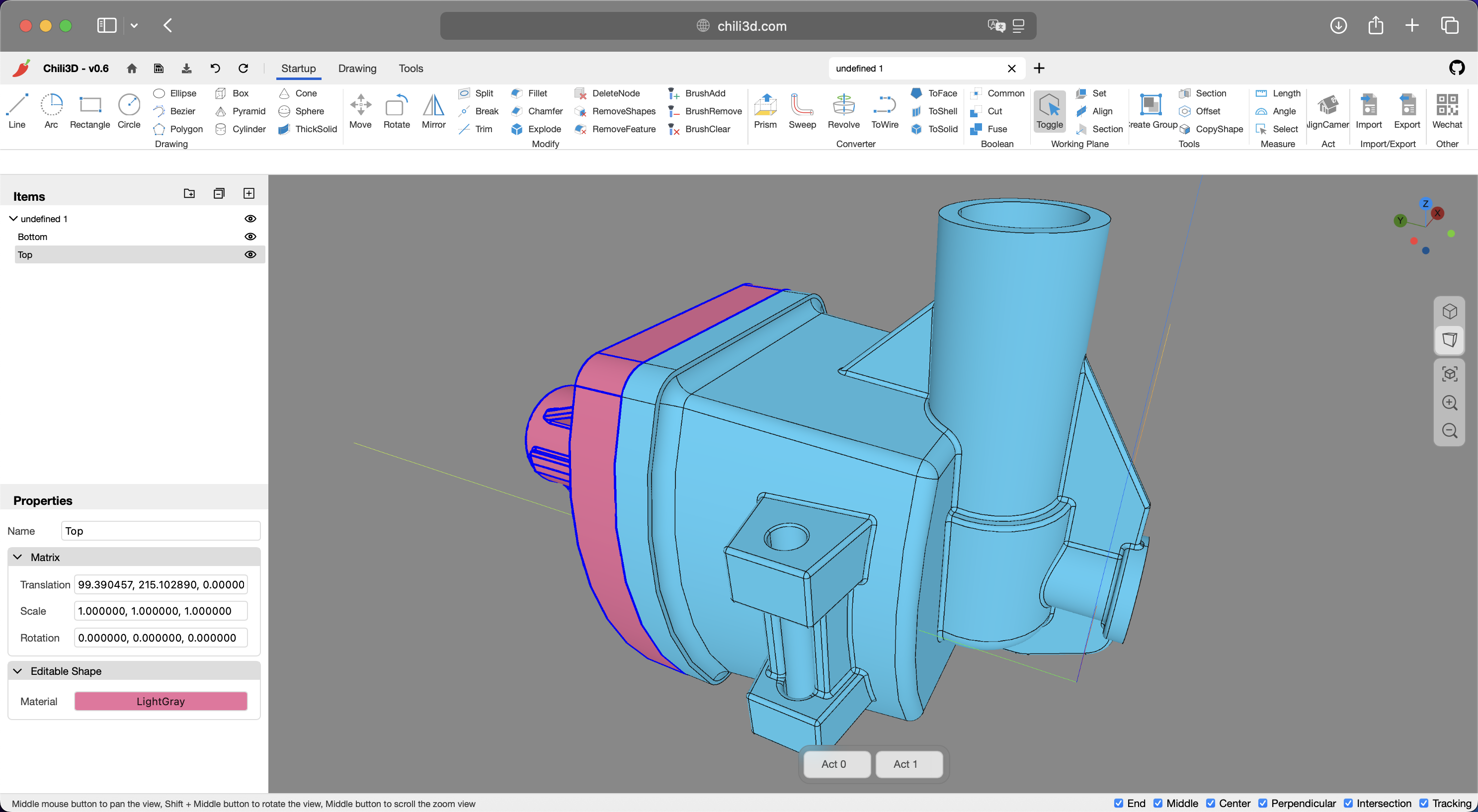
Chili3D is an open-source, browser-based 3D CAD (Computer-Aided Design) application built with TypeScript. It achieves near-native performance by compiling OpenCascade (OCCT) to WebAssembly and integrating with Three.js, enabling powerful online modeling, editing, and rendering—all without the need for local installation.
You can access Chili3D online at:
- Official website: chili3d.com
- Cloudflare deployment: chili3d.pages.dev
Features
Modeling Tools
- Basic Shapes: Create boxes, cylinders, cones, spheres, pyramids, and more
- 2D Sketching: Draw lines, arcs, circles, ellipses, rectangles, polygons, and Bezier curves
- Advanced Operations:
- Boolean operations (union, difference, intersection)
- Extrusion and revolution
- Sweeping and lofting
- Offset surfaces
- Section creation
Snapping and Tracking
- Object Snapping: Precisely snap to geometric features (points, edges, faces)
- Workplane Snapping: Snap to the current workplane for accurate planar operations
- Axis Tracking: Create objects along tracked axes for precise alignment
- Feature Point Detection: Automatically detect and snap to key geometric features
- Tracking Visualization: Visual guides showing tracking lines and reference points
Editing Tools
- Modification: Chamfer, fillet, trim, break, split
- Transformation: Move, rotate, mirror
- Advanced Editing:
- Feature removal
- Sub-shape manipulation
- Explode compound objects
Measurement Tools
- Measure angles and lengths
- Calculate the sum of length, area, and volume
Document Management
- Create, open, and save documents
- Full undo/redo stack with transaction history
- Import/export of industry-standard formats (STEP, IGES, BREP)
User Interface
- Office-style interface with contextual command organization
- Hierarchical assembly management with flexible grouping capabilities
- Dynamic workplane support
- 3D viewport with camera controls
- Camera position recall
Localization
- Multi-Language Interface: Built-in internationalization (i18n) supporting seamless adaptation to global user bases
- Current Languages: Chinese & English; contributions for additional languages are welcome
Technology Stack
- Frontend: TypeScript, Three.js
- 3D Engine: OpenCascade (via WebAssembly)
- Build Tools: Rspack
- Testing: Jest
Change Log
You can view the full change log here.
For Chinese users, you can also browse the media.
Getting Started
Prerequisites
- Node.js
- npm
Installation
-
Clone the repository
git clone https://github.com/xiangechen/chili3d.git cd chili3d -
Install dependencies
npm install
Development
Start the development server:
npm run dev # Launches at http://localhost:8080
Building
Build the application:
npm run build
Building wasm
if you want to build wasm by yourself, you can use the following commands:
-
Set up WebAssembly dependencies(if you have not installed them yet)
npm run setup:wasm -
Build the WebAssembly module:
npm run build:wasm
Development Status
⚠️ Early Development Notice
Chili3D is currently in active alpha development. Key considerations:
- Core APIs may undergo breaking changes
- Essential features are under implementation
- Documentation is being progressively developed
Contributing
We welcome contributions in the form of code, bug reports, or feedback. Please feel free to submit pull requests or open issues.
Contact
- Discussions: Join our GitHub discussions for general chat or questions
- Issues: Use GitHub issues to report public suggestions or bugs
- Email: Contact us privately at xiangetg@msn.cn
License
Distributed under the GNU Affero General Public License v3.0 (AGPL-3.0). For commercial licensing options, contact xiangetg@msn.cn
Full license details: LICENSE
Warning
Chili3d uses Microsoft Clarity for growth analytics. To disable data collection:
- Open public/index.html
- Delete lines 11-17 containing this code:
<script type="text/javascript">
    (function(c,l,a,r,i,t,y){
        c[a]=c[a]||function(){(c[a].q=c[a].q||[]).push(arguments)};
        t=l.createElement(r);t.async=1;t.src="https://www.clarity.ms/tag/"+i;
        y=l.getElementsByTagName(r)[0];y.parentNode.insertBefore(t,y);
    })(window, document, "clarity", "script", "***");
</script>
This software is provided "AS IS," and the authors and contributors hereby disclaim all express and implied warranties. The user shall bear full responsibility for any and all risks and potential consequences arising from the use of this software. Such risks and consequences include, but are not limited to:
- Data loss, system failures, or any direct or indirect damages;
- Conduct violating applicable laws or regulations resulting from software usage and its consequences;
- All liabilities arising from the software’s use for illegal purposes or activities.